Building a Portfolio—and the System That Keeps It Evolving
- Role
- Independent Product Designer / Design Engineer
- Timeline
- June 2026 – present
- Type
- Independent project

The project began as a low-cost attempt: using AI to build a distinctive, self-maintainable portfolio. At first I thought the question was simply “which AI builds the best website,” and the workflow was linear: a visual AI generates a full page, hands the whole package over, and an engineering AI re-implements it. The real challenge quickly became: how do multiple tools collaborate around one long-lived product without losing visual intent, engineering context, content relationships, and decisions already made?
Google AI Studio for visual exploration; Claude Code and Codex for code understanding, diff integration, debugging, and maintenance; DeepSeek API as a lower-cost model option for part of the early Claude Code workflow; GitHub for version state; Vercel for a working deployment; the Cloudflare path remains unresolved.
Evidence boundary: This is an ongoing independent project; it does not claim verified traffic, hiring conversion, task completion, or performance gains.
A working spatial portfolio with a conventional selected-work browsing path
Projects, tags, assets, case studies, and site copy each with distinct responsibilities
Three real projects with dedicated case-study pages in the August 2 system snapshot
Persistent product boundaries, implementation records, and shared AI working rules
Act One · Generation|AI produced the starting point, but not the priority
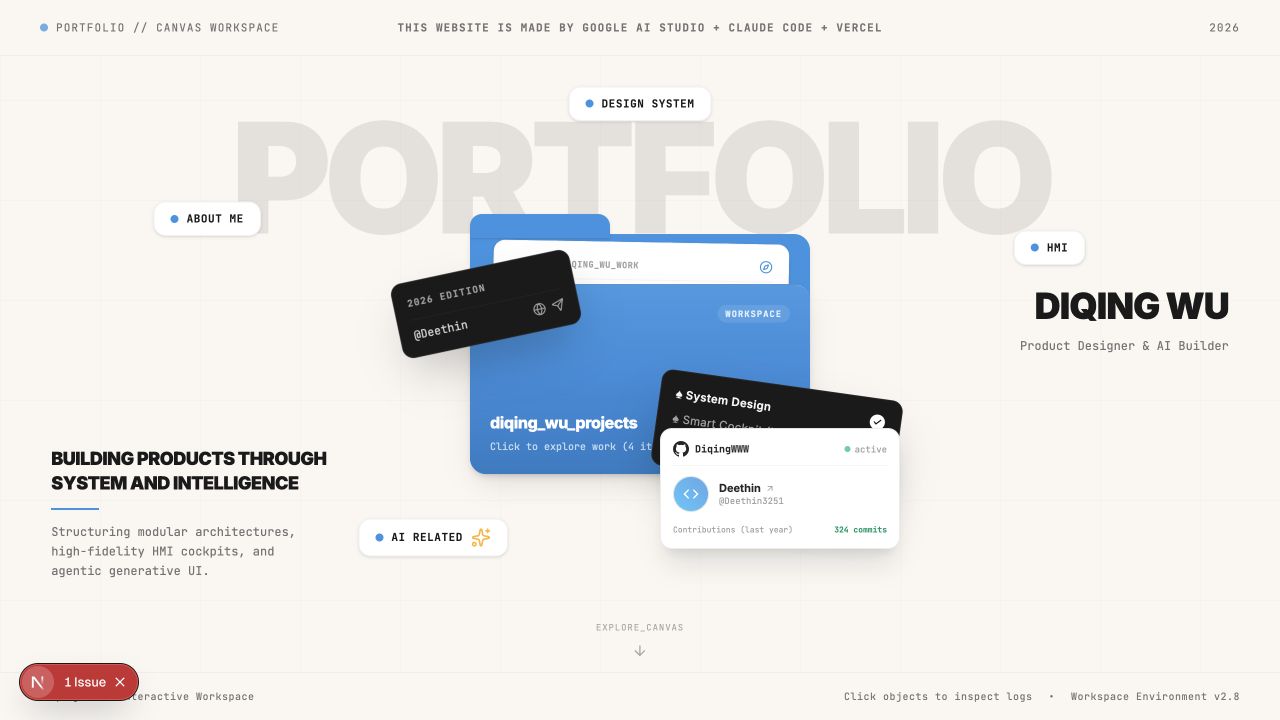
Under prompt constraints, AI Studio produced a recognizable Workspace concept: the Folder, capability tags, identity card, and canvas metaphor all appeared. But the result cared more about how rich the elements were than about information priority—AI produced a “complete-looking interface,” and complete is not the same as correct.
First draft: the prompt generated a concept, not a priority order
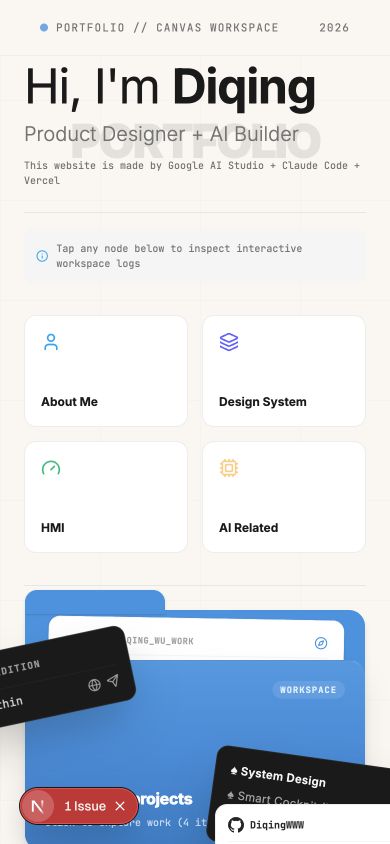
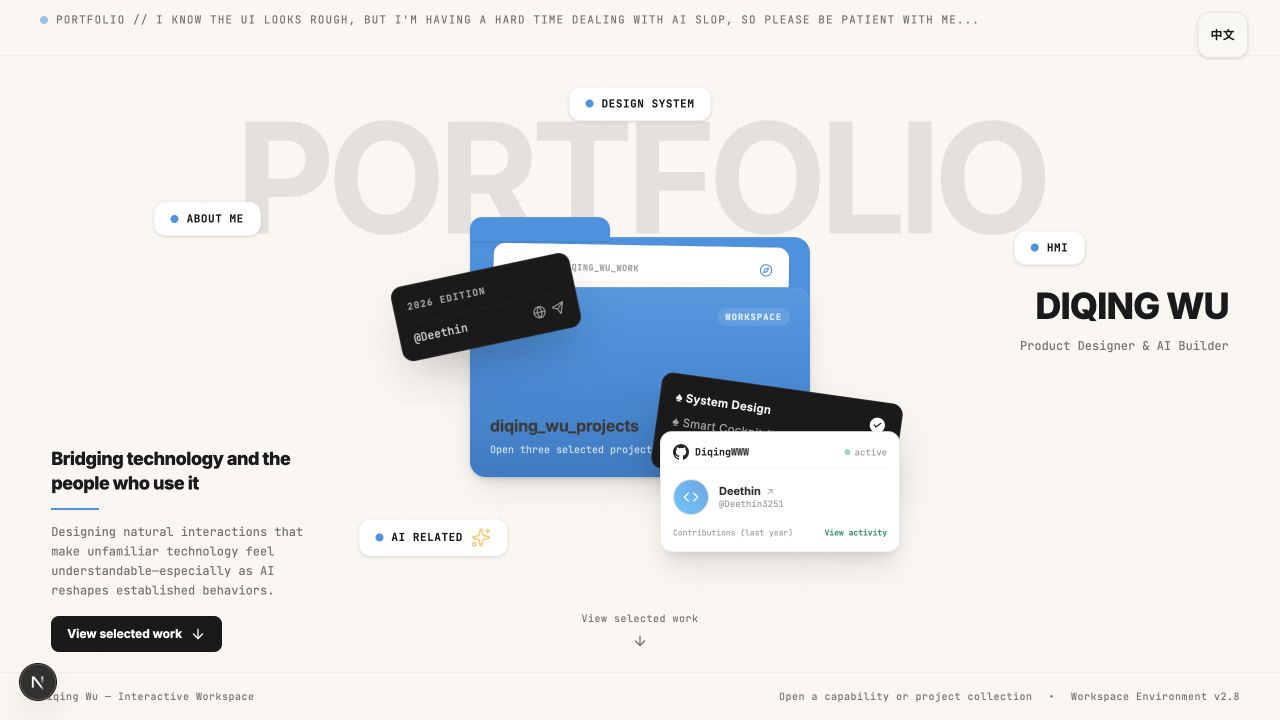
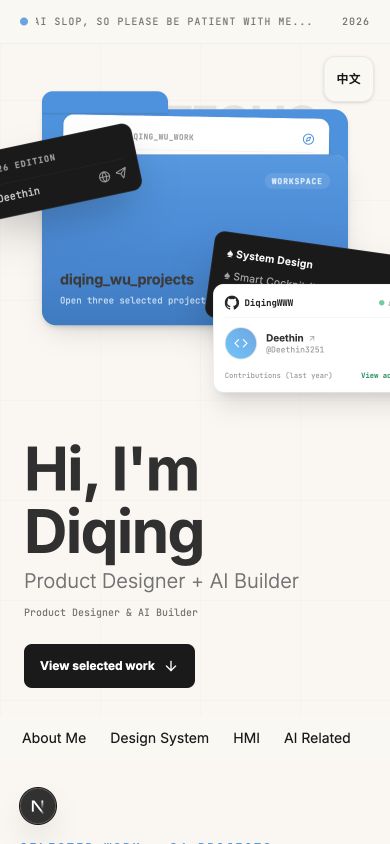
On desktop, the Folder, capability tags, identity block, and decorative cards carried similar visual weight; on mobile, the entries were simply stacked in sequence without reorganizing the browsing path.
Critique: turning vague unease into an actionable list of problems
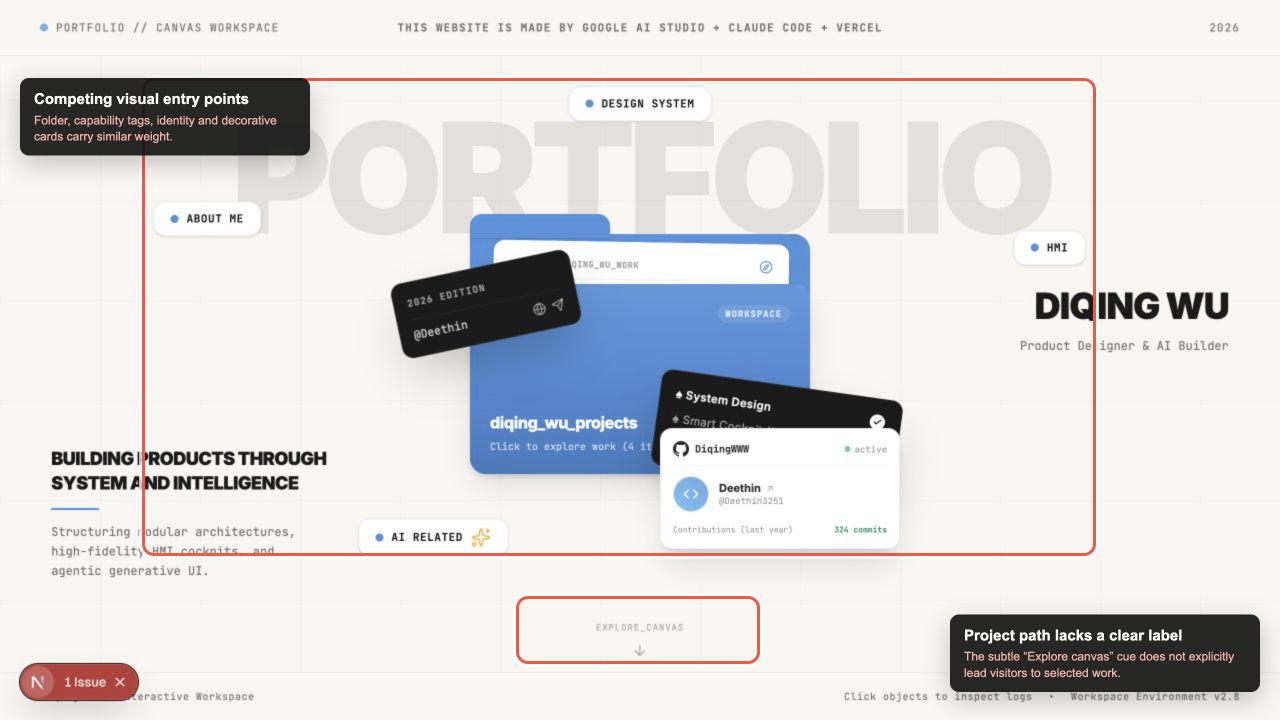
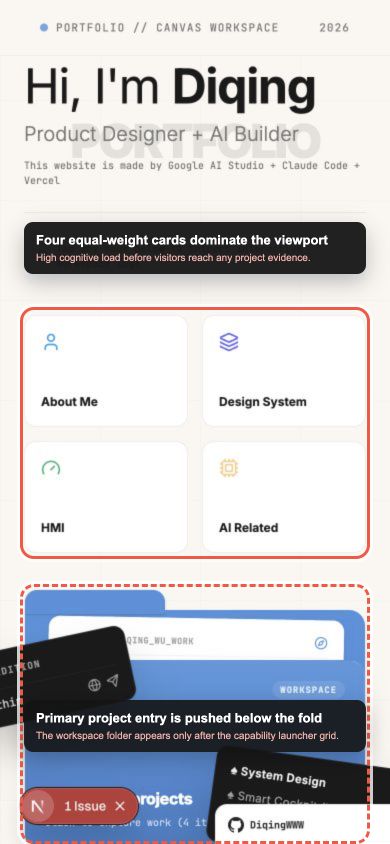
I ran an Impeccable-assisted critique as a diagnostic layer, turning vague unease into locatable, reproducible problems. It surfaced: the Folder, capability tags, identity block, and decorative cards competed for visual weight without a clear primary–secondary relationship; the Explore canvas read as environment decoration; and on mobile, four equal-weight capability cards consumed the first viewport while the real project entry fell below the fold.
AI produced the critique; I decided which recommendations were appropriate. I evaluated Impeccable's findings, rejected suggestions that would weaken the Workspace concept, and implemented the changes that improved hierarchy, spacing, typography, responsive behavior, and interaction clarity—Impeccable was a diagnostic layer, not an automatic redesign.
Refinement: rebuilding hierarchy around the project-discovery path
The Folder became the primary visual object on the first screen, an explicit View selected work entry was added, the conventional scrolling project list was kept as a second path, capability tags receded to secondary classification, and the contrast of the background typography and supporting cards was rebalanced. This Before / After demonstrates four design judgments: visual hierarchy, information architecture, responsive adaptation, and cognitive-load reduction.
Narrative guideline: do not write “Impeccable redesigned the website”; the accurate framing is—An Impeccable-assisted critique exposed hierarchy and responsive-structure problems. I selected the relevant findings and rebuilt the project-discovery flow around a primary workspace entry, an explicit selected-work path, and a lower-density mobile navigation.
Unification: the window visual language, from inconsistent to consistent
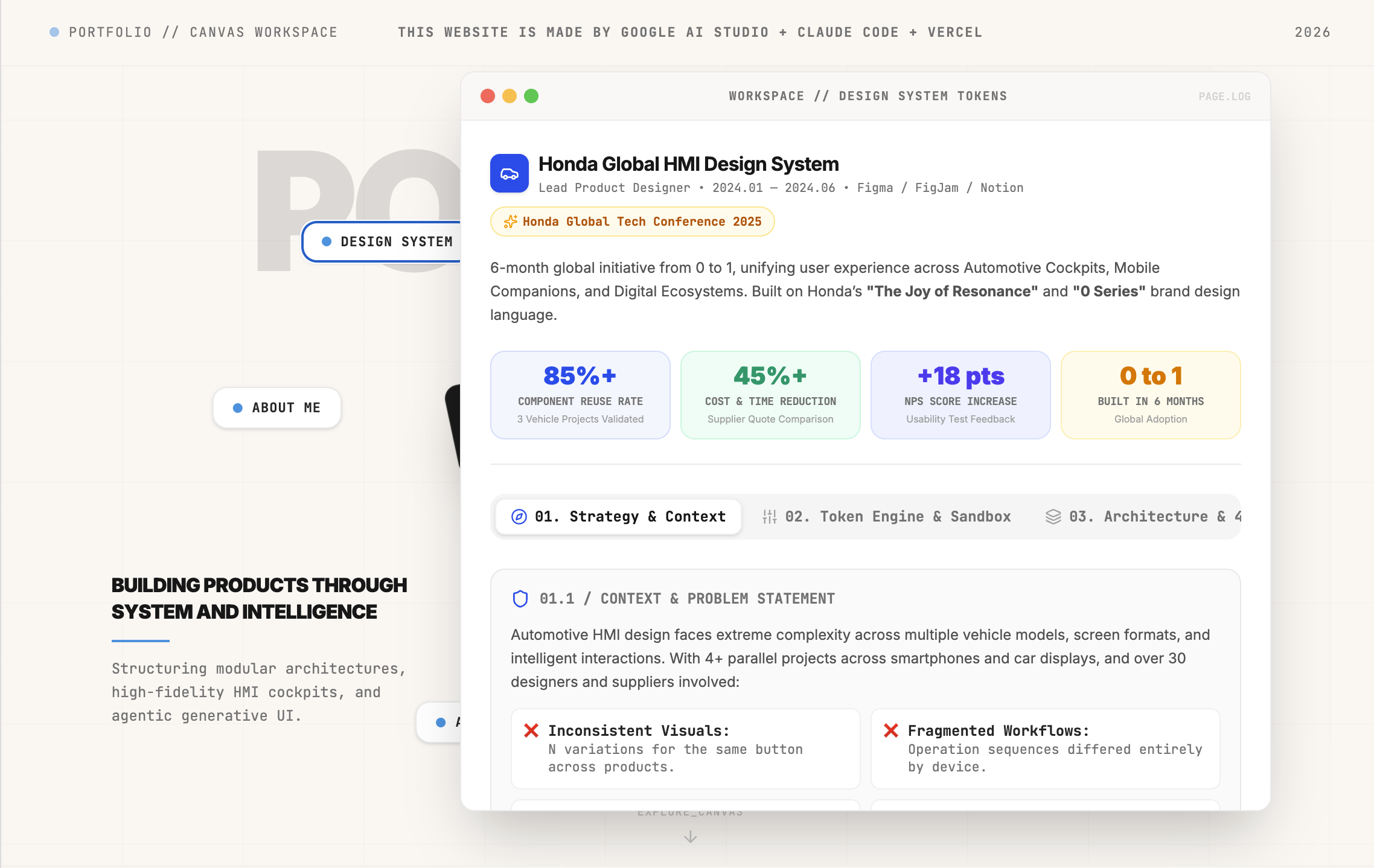
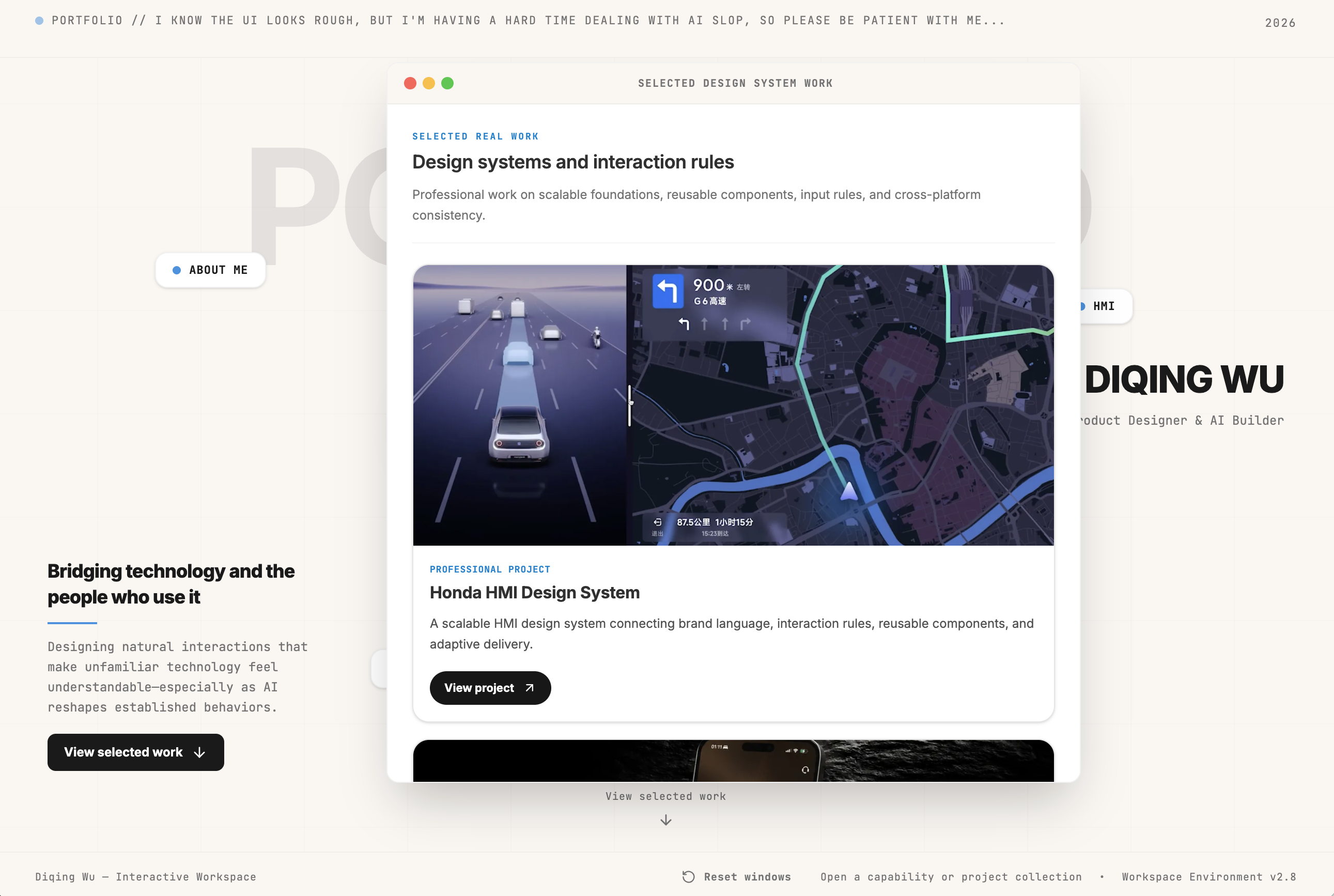
The windows opened by early tag interactions had almost no unified visual language: window proportions, title bars, close controls, and stacking behavior each went their own way. Improvements include restoring near-original title-bar proportions, removing an accidental blue outline, unifying the red–yellow–green control spacing, promoting the Window to a full-page overlay on mobile, and allowing dismissal only through the close button or a specified area outside the window.
Decorative elements receded while functional content gained priority—contrast was rebalanced according to content priority, not simply “improved.”
Act Two · Maintenance|The website was more than a page
When the visual results had to become a maintainable website, the real challenge appeared: the best visual tool was not the best engineering tool. I moved from full-package handoff to bounded diff sync, separated reusable tags from independent projects, and let engineering reality reshape the design judgment loop.
Decision 1: from full-package handoff to bounded diff sync
Google AI Studio reaches a target visual atmosphere faster, while engineering tools are better at understanding file structure, modifying components, and validating the project. Handing over the entire generated package preserves visual detail but risks overwriting local edits and inflating version-comparison cost; a pure UI spec describes type, color, and spacing but tends to lose complex components, motion, image relationships, and overall atmosphere.
Decision: I changed the unit of handoff: the running Next.js project remains the current state; the visual tool's output is a candidate change; the engineering tool first identifies the diff and tracks dependencies, then syncs only the parts confirmed to change.
Full-package handoff
No longer the default- 1Visual output
- 2Re-interpret whole page
- 3Overwrite risk
Bounded diff sync
Current workflow- 1Current system + candidate diff
- 2Impact check
- 3Local merge
- Verify
Evidence boundary: Bounded diff sync describes the current working method, not an automated sync product.
Decision 2: Tags are not Projects
The first working version already included a spatial workspace, tag launchers, a central project folder, and an identity card. It proved the experience direction could run, but it also exposed a structural problem: the early generated concept treated entries like About Me, HMI, AI Related, and Design System as folders or projects in a strictly tree-shaped taxonomy.
Decision: I separated reusable tags from independent projects. A project has a stable identity, public display name, content, assets, and case-study narrative, and can connect to multiple tags. Tags support interest-based discovery. The Mac OS folder remains a filter-free entry to all projects.

The website became a product: engineering reality reshaped the design judgment loop
Once the prototype entered Next.js, GitHub, and a real deployment environment, “looks fine locally” no longer meant “can be published, maintained, and evolved.” Build health, content traceability, platform compatibility, and regression risk forced the design loop to expand from “does the page look right” to “can this experience be maintained.”
The portfolio is a living product: minor versions keep updating along the main line; only a real major version that replaces the current experience justifies an archive route or a separate entry.
Vercel has hosted a working deployment, but access from mainland China is unstable. The Cloudflare path was genuinely attempted and remains unresolved; it is kept as an open constraint, not presented as a successful launch.
Act Three · System|Each update does not start from zero
The tools I use will continue to change, so what needs to be stable is not a fixed “design goes to A, development goes to B” split, but responsibility boundaries and shared product state. A new tool joining did not trigger another rebuild; it pushed me to persist the judgments scattered across conversations and code into layered records.
Decision 3: from workflow to Portfolio Operating System
The experience layer lets the website itself prove spatial organization, interaction, and visual judgment; the content layer lets projects, categories, media, and narratives evolve independently; the governance layer preserves long-term boundaries, current state, and scoped changes so the next AI does not have to re-interpret the whole project.
Portfolio Operating System
Experience layer
- Spatial Workspace
- Windows & motion
- Conventional project path
Content layer
- Project
- Tag
- Asset
- Case Study
- Global content
Governance layer
- Portfolio OS
- Current System
- Migration plans
- Audits
- AI Working Agreement
Evidence boundary: The Portfolio Operating System is not a standalone software product; it is a systematic description of the current portfolio experience, content, and collaboration model.
What this project proves, and what remains open
The outcome is not about how many AI tools were used, but about defining content entities, drawing boundaries between visual and engineering work, protecting existing product state, distinguishing evidence from inference, and turning ad-hoc decisions into a system that future collaborators can follow.
Spatial Workspace and conventional project browsing
Current implementationProject–tag relationships, project assets, and dedicated case studies
Current implementationBounded diff integration around a Git baseline
Qualified; not yet automatedProduct boundaries, current-state records, plans, audits, and shared rules
Current implementationWorking Vercel deployment; Cloudflare path unresolved
Qualified / unresolvedStill open
- Archive a verifiable AI Studio-to-repo diff and a full-handoff case.
- Generate and verify the final project–tag relationship diagram from current structured data.
- Record the final deployment decision once the Cloudflare path is resolved or dropped.
- Define performance, reading-behavior, and hiring outcomes only after stable data exists.
- Create V1/V2 history only after a real major experience is replaced.